Layer 1
Your machine.
A Mac, a Linux box or a server you rent. Container Port is one desktop app on it.
- macOS, Linux, Windows
A ship is a sealed container that holds a whole Docker stack, with its own address and its own data. The harbor is the desktop app that builds, backs up and connects many of them on one machine.
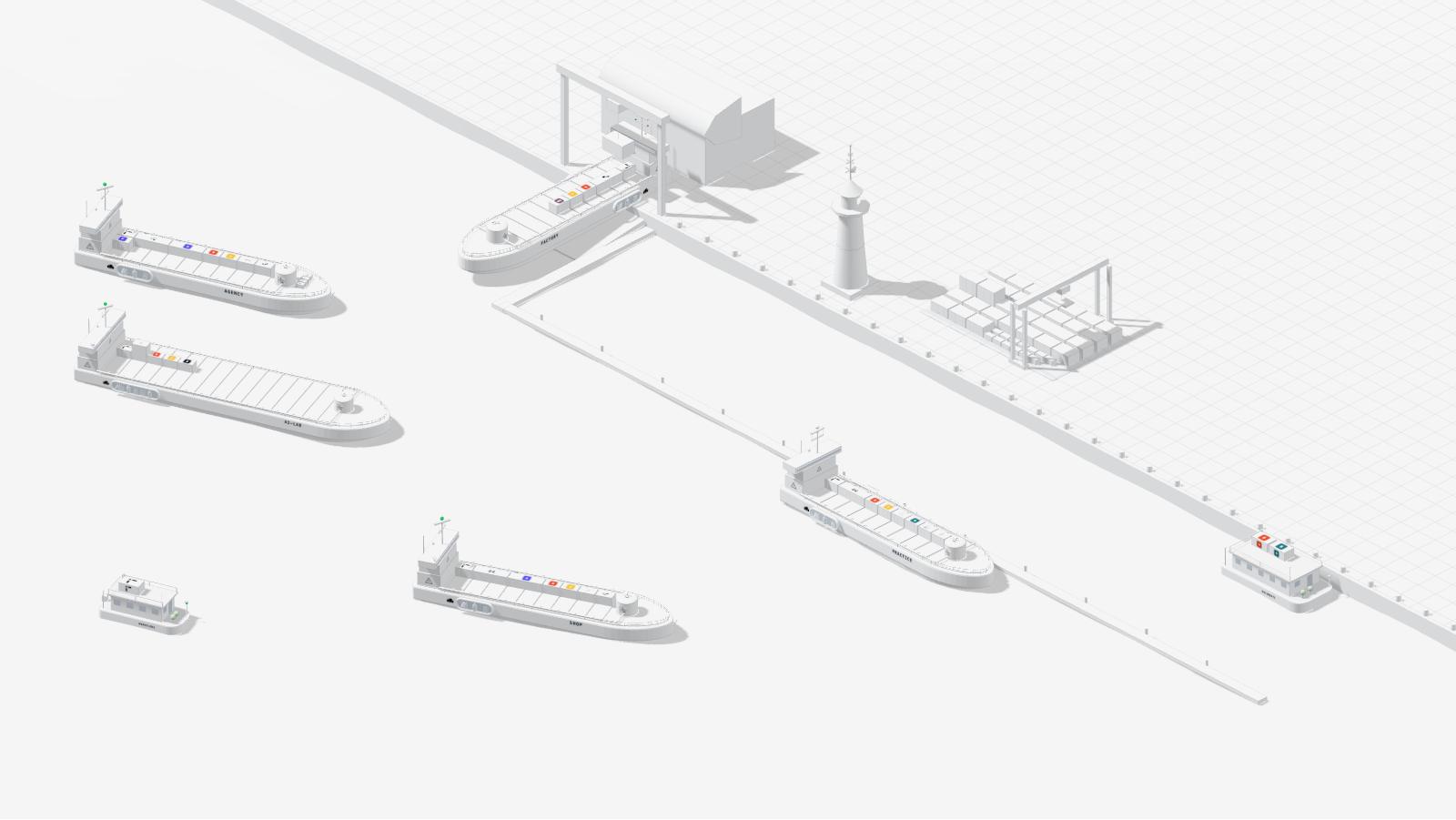
A still of the launcher's own harbor view.
The idea
Docker gives you containers. It does not give a whole stack a home: every project shares one engine, one set of ports, one pile of volumes. A ship is that home, a whole machine of its own. The harbor is the machine that runs them.









Layer 1
A Mac, a Linux box or a server you rent. Container Port is one desktop app on it.
Layer 2
One private network and one gate. On Linux the harbor runs on the machine itself. On a Mac it lives in a single small Linux VM. Every ship gets a fixed address here.
Layer 3
A complete Linux machine. It boots, runs its own services, has its own root disk and its own limits. Stop it, copy it, snapshot it or save it as one file. Its neighbors never notice.
Layer 4
Inside the ship runs a Docker engine nobody else uses, with one stack on it. Ports 80 and 443 are free on every ship, because every ship has its own.
Layer 5
Each app is a container on deck. Nextcloud, n8n and NocoDB carry every container ship. Everything else is cargo you choose.
To be precise: a ship is a system container, not a hardware-level virtual machine. It has its own init system, its own Docker, its own address, disk and limits, and shares only the kernel with its host. That is why it behaves like a VM, yet boots no second kernel and reserves no memory up front.
Its own Docker, address and disk. Nothing to share, nothing to collide.
A ship boots like a container and reserves no memory up front.
A ship gets the CPU and memory you gave it, and no more.
Freeze a ship's state before an update. Roll back if it goes wrong.
Back up, restore, move and clone a ship as a single file.
Ships cannot reach each other. One gate decides what comes in.
On board
This is the launcher's own ship model. Scroll to watch one come together.

Step 1
Give the ship a name and a flag. Container Port creates a fresh machine with its own file system and its own limits for CPU, memory and disk. Nothing is on board yet.
Step 2
Nextcloud is the hold that carries the data. TaskHQ is the bridge. Traefik is the antenna that takes requests. n8n is the piping between apps. The ship gets its address on the harbor network.
Step 3
Every other app is a container on deck. Small apps travel as parcels, heavy ones as high cubes, and they stack. The yard adds up the memory they need and tells you before launch if the ship is too small.
Then launch. The ship installs its stack on its own and reports each step. When it is done it drops anchor. Running ships lie at anchor, stopped ships are moored at the quay.
In action
This is the launcher's own harbor. A ship shows how it is doing: green at anchor, low in the water when it is overloaded, listing when a core part fails, sinking when it crashes. Try it.

The states and how they look come from the launcher's own code. The ship and its numbers are a sample.
The app
Container Port is a desktop app. These are its views, rebuilt for this page with sample ships. Click through them.
Running ships lie at anchor, stopped ones at the quay, new ones on the slipway. Pick a ship to open its sheet.
All 7At anchor 4Docked 2In the yard 1
At anchor · running · Panamax
10.77.0.11local
+ Connect a domain
Ship core
 TraefikHold
 NextcloudPiping
 n8nBridge
 TaskHQ
Cargo
WebwowPenpotPhotostoreIllusionatorOutdesignFigmentoPlausibleListmonk+7At anchor · running · Panamax
10.77.0.12local
+ Connect a domain
Ship core
TraefikHoldNextcloudPipingn8nBridgeTaskHQCargo
 Medusa
 TwentyListmonkPlausible
 Meilisearch
 NocoDB
 Tesseract
 Stirling PDF+3
Docked · stopped · Panamax
10.77.0.13local
+ Connect a domain
Ship core
TraefikHoldNextcloudPipingn8nBridgeTaskHQCargo
 Cal.com
 DocumensoTwenty
 Vaultwarden
 Collabora OfficeNocoDBTesseractStirling PDF+3
At anchor · running · Megamax
10.77.0.14local
+ Connect a domain
Ship core
TraefikHoldNextcloudPipingn8nBridgeTaskHQCargo
 Ollama
 Open WebUI
 QdrantMeilisearch
 Neo4jNocoDBTesseractStirling PDF+3
At anchor · running · Houseboat
10.77.0.15local
+ Connect a domain
Ship core
TraefikBridgeTaskHQPipingn8nCargo
NocoDBDocked · stopped · Barge
10.77.0.16local
+ Connect a domain
Ship core
TraefikBridgeTaskHQCargo
Stirling PDF GotenbergTesseractDocumenso
In the yard · being built · Panamax
10.77.0.17local
+ Connect a domain
Ship core
TraefikHoldNextcloudPipingn8nBridgeTaskHQCargo
 Odoo
 Plane
 Uptime Kuma
 Loki and PromtailNocoDBTesseractStirling PDF
 ACID+2
Address, domain, limits and cargo of every ship, with the actions you need most.
Every ship is its own sealed machine with a whole stack and its own address.
At anchor
WebwowPenpotPhotostoreIllusionator+5
OpenDockBack upMore ...
At anchor
TwentyListmonkPlausibleMeilisearch
OpenDockBack upMore ...
Docked
Cal.comDocumensoTwentyVaultwarden
OpenAnchorBack upMore ...
At anchor
Open WebUIMeilisearchNextcloudn8n+4
OpenDockBack upMore ...
At anchor
TaskHQn8nNocoDB
OpenDockBack upMore ...
Docked
TaskHQStirling PDFDocumenso
OpenAnchorBack upMore ...
In the yard
OdooPlaneUptime Kuma
OpenAnchorBack upMore ...
Name, plan, size, cargo, launch. The yard adds up the memory the cargo needs before you launch. Load a few apps and try it.
Cargo
Search apps ...

Deck
RAM
Feeder 18 slots · 4 CPU · 8 GB
The gate forwards the domain and its subdomains to that ship. Inside the ship each app answers on its own subdomain: cloud., n8n. and so on.
3 domains · 3 of 7 ships with an entrance · gate harbor-gate (running)
The app shows only the steps your machine is missing, each as a button. Check then tests the whole path from inside a ship.
Done: Homebrew · Colima and Incus · Start Linux VM · Create harbor · Connect this Mac to the ships
Check All good.
One click saves a ship as a single file: disk, Docker volumes and snapshots included. A schedule keeps the newest files per ship in a folder you choose.
Back up ships to files automatically
Target folder~/Backups/harbor
Intervaldaily
Files to keep per ship7
Alarm after hours without a backup48
| Ship | Last backup | Files | |
|---|---|---|---|
| agency | - | 0 | |
| shop | - | 0 | |
| practice | - | 0 | |
| ai-lab | - | 0 | |
| workflows | - | 0 |
Rebuilt in HTML from the app's real views. The app's interface is German today; the labels here are translated.
Network
Every ship lies in a closed basin. The only way in from outside is the gate, and the gate sends each domain to exactly one ship. Ships cannot reach each other.
Requests from outside enter in one place. Everything else is closed.
A domain and its subdomains lead to one ship and nowhere else.
A ship answers the gate and your own machine. It does not answer other ships.
Blueprints
A blueprint is a short file that lists the apps for one kind of work. Pick one, change the cargo if you like, launch.
Made for: Agencies and creative studios
WebwowPenpotPhotostoreIllusionatorOutdesignFigmentoPlausibleListmonkFormbricksMade for: Online shops and retail
MedusaTwentyListmonkPlausibleMeilisearchMade for: Consultancies, law firms, practices
Cal.comDocumensoTwentyVaultwardenCollabora OfficeMade for: Local language models and search
OllamaOpen WebUIQdrantMeilisearchNeo4jMade for: Manufacturing, trades, project work
OdooPlaneUptime KumaLoki and PromtailMade for: Any team
TraefikNextcloudn8nNocoDBTesseractStirling PDFACIDGotenbergTaskHQMade for: Workflows and tables, nothing else
TraefikTaskHQn8nNocoDBMade for: PDF tools, text recognition, signatures
TraefikTaskHQStirling PDFGotenbergTesseractDocumensoMade for: A local chat model, nothing else
TraefikTaskHQOllamaOpen WebUIMade for: A website and a newsletter
TraefikTaskHQWebwowListmonkEvery container ship starts from the base and adds to it.
A ship is as big as its cargo needs. A raft carries a single app. A houseboat carries a handful. Container ships carry the full stack.
| Size | Good for | CPU cores | Memory | Disk | Container slots |
|---|---|---|---|---|---|
| Raft | One app, one container. No frame around it. | 1 | 2 GB | 20 GB | 1 |
| Houseboat | Two or three apps with a proxy and a control panel. | 2 | 3 GB | 30 GB | 2 |
| Barge | A small, self-contained setup with up to six apps. | 2 | 4 GB | 40 GB | 6 |
| Cutter | A few tools for a small team. | 2 | 4 GB | 40 GB | 16 |
| Feeder | Nimble and frugal. The core stack fits. | 4 | 8 GB | 60 GB | 36 |
| Feedermax | The core plus one industry package. | 4 | 12 GB | 80 GB | 56 |
| Panamax | The all-rounder for agencies, shops and law firms. | 6 | 16 GB | 100 GB | 108 |
| Post-Panamax | Plenty of deck for many departments. | 8 | 24 GB | 120 GB | 150 |
| Neo-Panamax | AI models and the creative suite at the same time. | 12 | 32 GB | 160 GB | 180 |
| Megamax | A full load. Everything on board. | 16 | 64 GB | 250 GB | 336 |
These are the yard's suggestions. You can change CPU, memory and disk for any ship at any time.
Cargo
This is the launcher's container terminal. Every app the stack can carry stands here as a container. Point at one to see what it is. Click it and it goes on board the ship at the quay.
Files, calendars and contacts. The home of every ship's data.
Automation. Connects apps, forms and data without code.
A database with a spreadsheet face: lists, forms and an API.

On board nothing loaded yet
Point at a container, click to load it. With the keyboard: arrow keys choose, Enter loads.
NextcloudFiles, calendars and contacts. The home of every ship's data.n8nAutomation. Connects apps, forms and data without code.NocoDBA database with a spreadsheet face: lists, forms and an API.TaskHQStart, check and back up the stackTraefikReverse proxy inside the shipUptime KumaWatches services, reports outagesLoki and PromtailAll container logs in one place ntfyPush notificationsCollabora OfficeDocuments and sheets in the browserStirling PDFMerge, split, redact, signDocumensoDigital signaturesTesseractText recognition for scansGotenbergTurns documents into PDFACIDDocument converterTwentyContacts, companies, dealsCal.comAppointment bookingPlaneTasks and projectsOdooInventory, production, accountingMedusaShop and storefrontVaultwardenPassword vault for the teamFormbricksSurveys and forms
 GhostfolioPortfolio trackingWebwowVisual website builderPenpotDesign and prototypingPlausibleWebsite statistics without cookiesListmonkNewsletters and mailing lists
 ImmichPhoto and video libraryOllamaLanguage models that run on the shipOpen WebUIChat interface for those modelsQdrantVector database for searchNeo4jGraph databaseMeilisearchFast full-text search
 EnterCode editor with an AI agent
 OpenClawSteer the ship by chatPhotostoreImage editingIllusionatorVector graphicsOutdesignPage layoutFigmentoInterface design
 PremixerVideo editing
 Later EffectsMotion graphics
 BrightroomPhoto library and RAW
 AudiationAudio workstation
 AkrobatPDF workbench
 WordsmithWord processing
 ExcelsiorSpreadsheets
 PowerpaintPresentations
 Fission2D and 3D CAD
Who it is for
One ship per client. Each client gets their own files, their own automations and their own domain. When a client leaves, hand over the ship as a single file.
Separation here is not a permission setting inside one big app. It is a network boundary and a separate disk. A mistake on one ship cannot leak into another.
Try a new stack without touching the one you rely on. Take a snapshot before an update and roll back if it goes wrong. Keep everything on hardware you own.
Get started
One desktop app for macOS, Linux and Windows. Download it, open it, and let it set up the rest.
Downloads are coming with the first release. The installers are not published yet. Until the first release, you can build the app from source, see below.
macOS 11 or later
Apple silicon .dmgIntel .dmg
x86-64
AppImageDebian, Ubuntu .deb
x86-64, connects to a harbor in WSL2 or on a Linux machine
Installer .exe
The app checks what your machine is missing and shows only those steps. Each step is a button. On a Mac it sets up one small Linux virtual machine for the harbor. On Linux it installs the container engine and sets up its network and firewall. Where a step needs admin rights, your system asks for the password.
A built-in check then tests the connection from inside a ship and names the cause if something is off. On Windows the app connects to a harbor in WSL2 or on a Linux machine, and that connection is still set up by hand.
For developers, and for everyone until the first release. It needs Node.js and git, and Incus for the ships.
The repository is private at the moment. You need access to it for the steps below.
On a Mac, Incus runs inside a slim Linux virtual machine managed by Colima. The setup screen in the app installs and starts both with one click each. If you prefer to do it by hand:
brew install colima incus
colima start --runtime incus
Works on Apple silicon and Intel. The app then connects on its own.
On Linux, Incus runs directly on your machine. On Debian 13 or Ubuntu 24.04 and later:
sudo apt install incus
sudo incus admin init --minimal
sudo usermod -aG incus-admin $USER
Log out and back in so the group applies. The setup screen in the app shows each step with its status. Fedora is covered there too.
On Windows, Incus runs in WSL2 or in a Linux virtual machine, and the launcher connects to it over HTTPS. Inside that Linux system:
incus config set core.https_address :8443
incus config trust add-certificate client.crt
The second line trusts the launcher's client certificate, which you copy over from the Windows machine. Then open Settings in the launcher, choose HTTPS, enter the address and confirm the server's fingerprint. The same steps connect the launcher to a remote server.
git clone https://github.com/The-Wilhelm-Project/Wilhelm-Techstack.git
cd Wilhelm-Techstack/tools/harbor
npm install
npm startUnder the hood
No magic, only well-known parts put together carefully.
.env, and the stack installer runs without questions. Traefik routes subdomains to the apps.10.77.0.0/24, with outbound NAT. An access list drops all inbound traffic to ships except from the host and the gate. Outbound stays open so ships can pull images../wilhelm.sh harbor snapshot agency before-update
./wilhelm.sh harbor backup agency ~/agency.tar.gz
./wilhelm.sh harbor import ~/agency.tar.gz --name agency-restore
./wilhelm.sh harbor route add client.example.com agency --tls auto
./wilhelm.sh harbor route applyThe core operations are also commands. The app and the command line share one library.